
Web Design
2nd Quarter 2005-2006
Cleveland Classes
1st Quarter 2005-2006
Dreamweaver Techniques

 |
 |
 |
|
Daily Agenda
Thursday, February 2
Last day!
Well folks, I've made it to the end of my first semester as a teacher. You've accomplished a lot, especially considering that we lost almost five weeks from the first quarter. I'm proud of what everyone in the class has learned.
Please take a Semester Evaluation form from my desk and give me your frank feedback. Your name is optional.
Put the finishing touches on your final project. Dont forget to synchronize your FINAL project to the outbox!
If you have extra time, don't forget to add alt text to your pictures and and a page title, as well as credit all pictures on your artifact project. Fill out two web site reviews if you haven't done them already.
Monday, January 30
Last week of the semester
There are three days left in the semester for this class. This class won't have a final exam.
Finish up your final project and work on unfinished assignments. Read each page to yourself and look at the grammar. Use the spell checker (choose the Text menu then choose Check Spelling).
Remember that if you are on a final project team you must do at least one web page.
Tomorrow I'll ask you to fill out an evaluation of how this class went, so think about it.
During the week I'll present a few short web design topics:
-
local folders and remote folders
-
two-way synchronization - Put and Get
-
style sheets - no more layout tables!
Wednesday, January 18
Final Project
You now have a personal folder for your final project. If you are in a team you have a team folder.
This folder is in my outbox under "writeable" , then "final project", then your user name.
If you haven't made a site for your project in Dreamweaver, make one now. See these instructions.
At the start of this period and every day until the end of the term you will write a short journal entry. Your journal is in your final project folder in my outbox. See Assignment #14 for details.
Tuesday, January 17
Final Project
I've written more specific guidelines for the final project.
Here are the additions:
-
A rough draft is due on Tuesday, Jan. 24
-
There is a rubric for each type of project
Take a look at the final project page for details and the rubric. Also, look in the outbox for your grade on your small business web site or your artifact web page to get an idea of how I'll use the rubric.
Almost all of the Artifact web pages are missing alt text and page titles. This was part of the rubric. You may fix this and resubmit, but you must let me know so I'll grade your page again.
Wednesday, January 11
Final Project
You need to decide today what your final project will be about. Do assignment #10 and talk to me if you have any questions.
The first step in building a web site is to know who will use it and how they will use it. Once you've decided on the subject for your final project, do assignment #11: Final Project Goals.
Tuesday, January 10
Final Project Subject
You should be done or almost done with your artifact web pages. Remember to check spelling (on the Text menu) and to do the design document.
The first step in the final project is to choose a subject. Do assignment #10, which will tell my what your final project will be about.
Friday, January 6
Artifact Web page
Introduce Final Project
Continue working on your artifact web page (Assignment #9). This is due on Monday.
If have your paper layout from assignment #7, make sure you get credit for it. Otherwise, you may get credit by doing a paper layout for your artifact web page.
Look in the your team's readable folder for an explanation of your score on the small business web site.
Start thinking about what you want to do for your final project (Assignment #11). You need to identify exactly what your subject is by Wednesday, Jan. 11.
Tuesday, January 3
Artifact Web page
Today you start work on your Artifact Web Page.
We will also discuss the following Dreamweaver topics:
Wednesday, December 14
Turn In : Small Business Web Site
Review: Other Teams' Web Site
Below is a table of what I have for each team. Only one team has a complete web site.
Today, for the first 20 minutes I'll work with each team to get all your work up to the team folder while you try to fix the issues noted in the table.
For the rest of class, each of you will review two other web sites. See Assignment #1 for details.
| Team | Design Document | Small Business Home Page | Pages | Ready for Review? |
Issues |
| 1 | Here | House of Soul | 2 | N | One page needs much more content. Pages aren't linked together. |
| 2 | Here | Bacchus Restaurant | 1 | N | The page that's there is very nice. |
| 3 | Here | Missing | 0 | N | You need to copy your page to the team folder! |
| 4 | Here | All Access | 1 | N | The one page is missing graphics. |
| 5 | Here | Silver Star | 3 | N | Starting to look like a complete web site! |
| 6 | Here | Blazing AF1 Kicks | 2 | N | One page needs lots more content. Pages aren't linked together. |
| 7 | Here (maybe) | Nique | 1 | N | The one page needs much more content. There are three different design documents. |
| 8 | Here | Missing | 0 | N | You need to copy your page to the team folder! |
Click here for the latest update to this table.
Note: links to student work point to a local server and don't function outside of Cleveland High School.
Tuesday, December 13
Finish : Small Business Web Page
Several teams don't seem to have web sites or design documents inside their team folders. I've seen some of your work so I'm hoping it's in your individual folders. Please put your web site up in the team folder! Here's what I have so far:
| Team | Design Document | Small Business Home Page | Issues |
| 1 | Here | House of Soul | No other pages |
| 2 | Missing | Bacchus Restaurant | No other pages. Missing graphics. |
| 3 | Here | Missing | |
| 4 | Here | Missing | |
| 5 | Here | Silver Star | Pages 2 and 3 barely started or missing graphics. |
| 6 | Here | Blazing AF1 Kicks | |
| 7 | Here (maybe) | Missing | There are three different design documents. |
| 8 | Here | Missing |
Note: links to student work point to a local server and don't function outside of Cleveland High School.
Friday, December 9
Continue: Small Business Web Page
I see some very cool web sites coming along! I'm extending the due date for the team project, assignment #7, to next Monday, Dec. 12. Click on the assignment link and take another look at the rubric.
You should have finished your paper layout yesterday.
Wednesday, December 7
Small Business Web Page - Team Project
Continue working on the team project, assignment #7. It's due this Friday.
At the start of class today you should be finishing the Design Worksheet and working on your Paper Layout. Do not start using Dreamweaver until you have a paper layout of each page.
Tuesday, December 6
Small Business Web Page - Team Project
Start the next team project, assignment #7. It's due this Friday. Please read the directions carefully.
Note: I've changed the team projects around a bit. Your current team's last project is assignment #7, the web site for a small business.
Next week, after this project, you'll do at least one individual assignment and then choose your own teams for the final semester project.
Monday, December 5
Finish Class Web Page Redesign
See each team's latest version of the class web page:
| Team 1 | Team2 | Team3 | Team4 |
| Team5 | Team6 | Team7 | Team8 |
Finish the Class Web Page Redesign with your group. At the end of the period we'll vote for the best one and I'll convert this page's style over to it.
Friday, December 2
Continue Class Web Page Redesign
You have a substitute today.
Work on the Class Web Page Redesign with your group. See yesterday's instructions. On Monday we'll vote for the best one.
Thursday, December 1
Class Web Page Redesign
Today you'll go back to the class web page redesign. Use your imagination! Click on the link to see how the assignment will be graded. At the end of tomorrow's class we'll vote on which team's design should be used for the rest of the quarter.
I used Fireworks to jazz this web page up a bit last night. As part of your redesign, you'll each add some Fireworks graphics to your team's copy of the page.
Remember that your team has one copy of the class web page in their team outbox folder at dllevine\writeable\4th period. Each of you will add a new Fireworks graphic to this folder. Remember that only one team member at a time can have the web page open in Dreamweaver or else you'll replace each other's file on the server.
We'll start with a 10 minute demo of some Fireworks features:
-
Transparent colors
-
Transforming shapes
-
The Fireworks help system
-
Transparent canvas
-
Fit Canvas
-
Exporting to a GIF file
Click here for more information on using these features.
Wednesday, November
30
Fireworks Tutorial
Spend today on the Fireworks tutorial
Tuesday, November
29
Fireworks Tutorial
Spend today on the Fireworks tutorial
Monday, November
28
Class Web Page Redesign
and
Fireworks Tutorial
Today will run like last Wednesday with two activities. See the previous day (below) for details.
- Team Activity: Class web page redesign (20
minutes)
Continue working on redesigning the class web page. Remember that only one person should be editing the page at a time. This is due tomorrow.
- Individual Activity: Fireworks tutorial (25
minutes)
Continue the Fireworks tutorial.
Please turn in your personal web site. Drag the entire web site folder to the outbox.
Wednesday, November
23
Class Web Page Redesign
and
Introduction to Fireworks
There are two activities for today:
- Team Activity: Class web page redesign (10
minutes)
Start working on redesigning this web page (assignment #6). Pick one team member to open the class web page in Dreamweaver. Your team has its own copy of the web page in my inbox. Open the writeable folder then open the 4th period folder then open your team folder.
As a team, play with the colors and the fonts. Maybe add some free images from this public domain image web site. The class will vote next week on the best version, which will be used for the rest of the quarter.
Today you only have a very short time to get started with this assignment. You'll come back to it next Monday after you spend some time with Fireworks. Since you only have ten minutes and only one person can edit the page you'll need to cooperate in a mature fashion.
- Individual Activity: Fireworks tutorial (30
minutes)
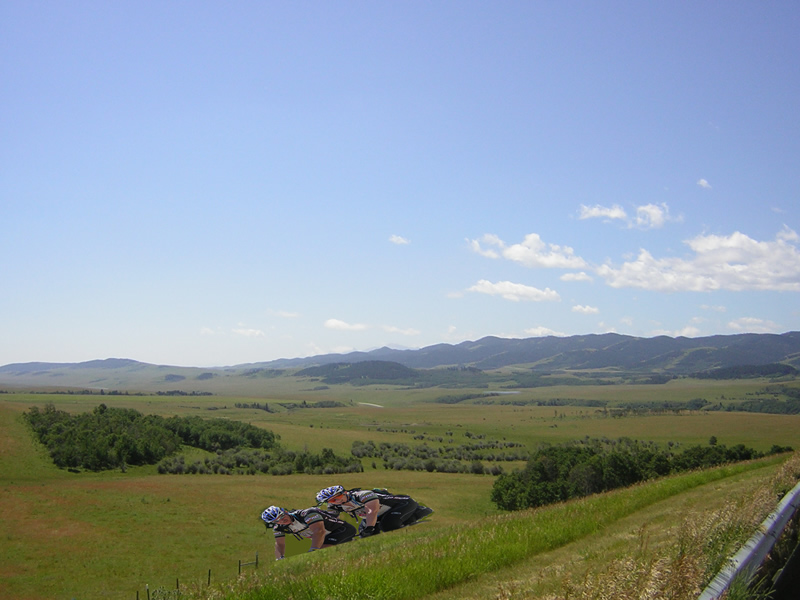
Macromedia Fireworks is a tool for creating and changing images. One simple example is this sample logo I made for Assignment #7. Another is this photo where I put a tandem bicycle behind the grassy slope. Fireworks is a very complicated program. We're only going to learn a small piece of it in this class.
For today, you'll start a tutorial that introduces some basic Fireworks features. The tutorial is located here. You should get at least up to the page titled "Creating Shapes by Joining Others" (page 9). Read the steps very carefully. Ask your teammates for help before asking me.
Tuesday, November
22
Introduce the Team Project
For this project, the class is divided up into competing team. Each team is a web design company. Your team will design a web site and then compete with the other teams to sell it to a customer.
As part of a design team, I expect you to act professionally and responsibly. You may wish for different team members, but in the real world you are often unable to choose who you work with.
For most group assignments, you will be graded on group work and also have one web page that you're responsible for individually.
This group project will take about two weeks. It has these parts:
- Get to know your team members. Fill out the
survey form.
- Team Competition: Design colors and a layout
for the class home page
- Design and build your team’s home page,
including a logo.
- Team Competition: Design and build a web site
that calls for change or action in your school, community, or beyond.
Here are the teams for this group project:
| 1 | Ross | Naila | John C. |
| 2 | Kevin | Tia | Chezaray |
| 3 | Keenan | Damico | Sugar |
| 4 | Kenny S. | John G. | Ny'Nrica |
| 5 | Kenny A. | Ariechell | Amran |
| 6 | Raymond | Mohammed | Shaniqua |
| 7 | David | Coolwater | Jerrehl |
| 8 | Bakari | Jamie | Vandara |
Today you will get to know your team members and start working on ideas for the group project.
Please do:
Assignment #5 - Team Member Survey Form and Team Roles (Due Today)
Monday, November
21
Finish your personal web sites
Put some finishing touches on your web site. Have some fun with it!
You will turn your personal web site into my outbox. Drag the entire web site folder to the outbox.
Friday, November
18
Work on your personal web sites
Next week the class will split up into teams. Each team will be a web design company. Your team will design a small web site together.
Thursday, November
17
Add color and a table to your web site
Agenda:
Demo of adding colors and tables to a web site
| Dreamweaver Technique:
Changing a Web Page’s Colors Click on the Modify menu and then click on Page Properties… You will see the Page Properties dialog box, which lets you control the color of the background, the headings, the text, links, and more. |
Assignment #4 - Finish Personal Web site (Due Monday, November 21)
·
Add a color theme to your personal web site.
· Add a table to your
personal web site
· Finish your personal web site by next Monday, November 21.
Wednesday, November
16
Exploring Colors
Assignment #3: Color and Layout (Do in class)
Tuesday, November
15
Journaling
Your teacher today is Ms. Heidelman or another substitute while I’m on the field trip to ITT Technical Institute in Everett.
How’s the computer class going for you so far? Give me some feedback. Today’s assignment is to do some journaling. Fill out the evaluation form below and drop it in my outbox.
Assignment #2: Journaling – how did the last quarter go? (Due Tuesday, November 15)
Monday, November
14
Work on Personal Web Site
This is a new quarter in Mr. Levine’s web design class. Click on this link to see a rough outline of what we’re doing second quarter.
Today’s class goal is to get all students able to create a simple web page.
· Students who haven’t finished their sandbox assignment (#3 and #4) will get a mentor.
· Students who have shown good technical skills will mentor students who didn’t finish the sandbox.
You’ll also do:
Assignment #1: Web Site Design
Feedback (Due Monday, November 14)