Web Design
Mr. Levine
October 17, 2005
Assignment: HTML in the Raw
Read this document, read the “Beginners Guide to HTML” document, and make a web page with Notepad that uses the following HTML tags:
<html>
<heading>
<body>
<H1>
<P>
<UL>
<LI>
<OL>
Due: October 18, 2005
Send your document to me using NetMeeting
Points: 5
HTML stands for Hypertext Markup Language. It’s the basic language of the web. Tools like Microsoft Word and Macromedia Dreamweaver output HTML. Web browsers like Internet Explorer read HTML to draw web pages.
In this assignment, instead of using Word or Dreamweaver you’ll be writing “raw” HTML. This will help you understand the “guts” of web pages so that you’ll be able to use higher level tools (like Dreamweaver) more effectively. If you’ve never seen HTML, this new stuff may seem complicated. Be patient and let it sink in.
HTML is a way of “marking up” plain text so that a web browser knows how to show the web page. It tells the browser how big to make the text, where to put the text, where links go, and where to put photos and other graphics.
The browser looks at HTML “tags” to figure out how to show a web page. The most important thing to know about tags is that they usually come in pairs. For example, a major heading is signaled by the tag <H1>. “H1” is the name of the tags and the angle brackets “<>” tell the browser it is a tag and not just plain text. The <H1> tag starts the heading and the </H1> tag (note the slash inside the angle brackets) ends the heading.
Most of the text on a web page is in a paragraph (like the paragraphs on this page). Paragraphs use the <p> tag.
There are a lot of tags. Really a lot. Although there will be a quiz on HTML, you won’t need to memorize the tags. There is a sample test question at the bottom of this document.
Here is a simple HTML document:
<html>
<h1> This Is My Heading </h1>
<p> This is normal text in a paragraph </p>
</html>
On a web page it will look like this:
This Is My Heading
This is normal text in a paragraph
Follow these steps to do the assignment:
1) For this assignment, you be use Notepad to write HTML. Notepad comes with Microsoft Windows. Unlike Word or Dreamweaver, Notepad only lets you edit plain text with not fonts or graphics. To run Notepad, click on the Windows “Start” button, then “Programs”, then “Accessories”, then “Notepad”.
2) Type the simple HTML document from the box above into Notepad. Save the document into your “My Documents” folder and give it a “.htm” file extension. For example, “foo.htm” as shown:

3) Now, use Windows Explorer to open your web page. Click on “My Computer”, find the document you just saved, and click on it. You should see the heading and one line of text.
The “.htm” extension tells Windows to use your web browser to open the file. Leave Notepad and Internet Explorer running as you work on the assignment.
4) To complete the assignment, you need to know a bit more about HTML and HTML tags. Read the document “A Beginners Guide to HTML” all the way down to the heading “Preformatted Text”. This should give you enough information to figure out how to use the tags required by this assignment.
As you read about each new tag, add at least one sample of that tag to your
Notepad document. Each time you add a new tag, save the Notepad document, go
over to your web browser, and hit the Refresh button ( ) or press F5.
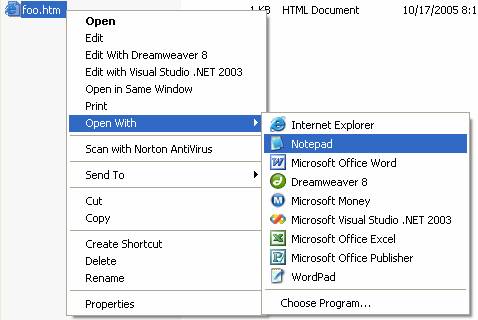
If you close Notepad and need to edit the HTML document again you can’t just double click on it because that will just open the browser again. Instead, right click on the document and choose “Open With” and then “Notepad”:
Your final web page might look something like this:
Some Seattle High Schools
If you go to a high school in Seattle, you've probably heard of these schools:
- Cleveland
- Franklin
- Sealth
I like Cleveland High School because:
- I get to go over the West Seattle Bridge to get there
- It has the same name as the town I was born in
- It has the same name as a former President
Sample Test Questions
The quiz on HTML will have questions like these:
1) You just learned a new HTML tag called <HIGHSCHOOL>. What does the closing tag look like?
2) Look at the following HTML:
<UL>
<LI> Cleveland
<LI> Franklin
<LI> Sealth
</UL>
What will the browser display?
a)
· Cleveland
· Franklin
· Sealth
or
b)
Cleveland
Franklin
Sealth